Why Your Reverse Tax Calculator May Not Match Your Receipt
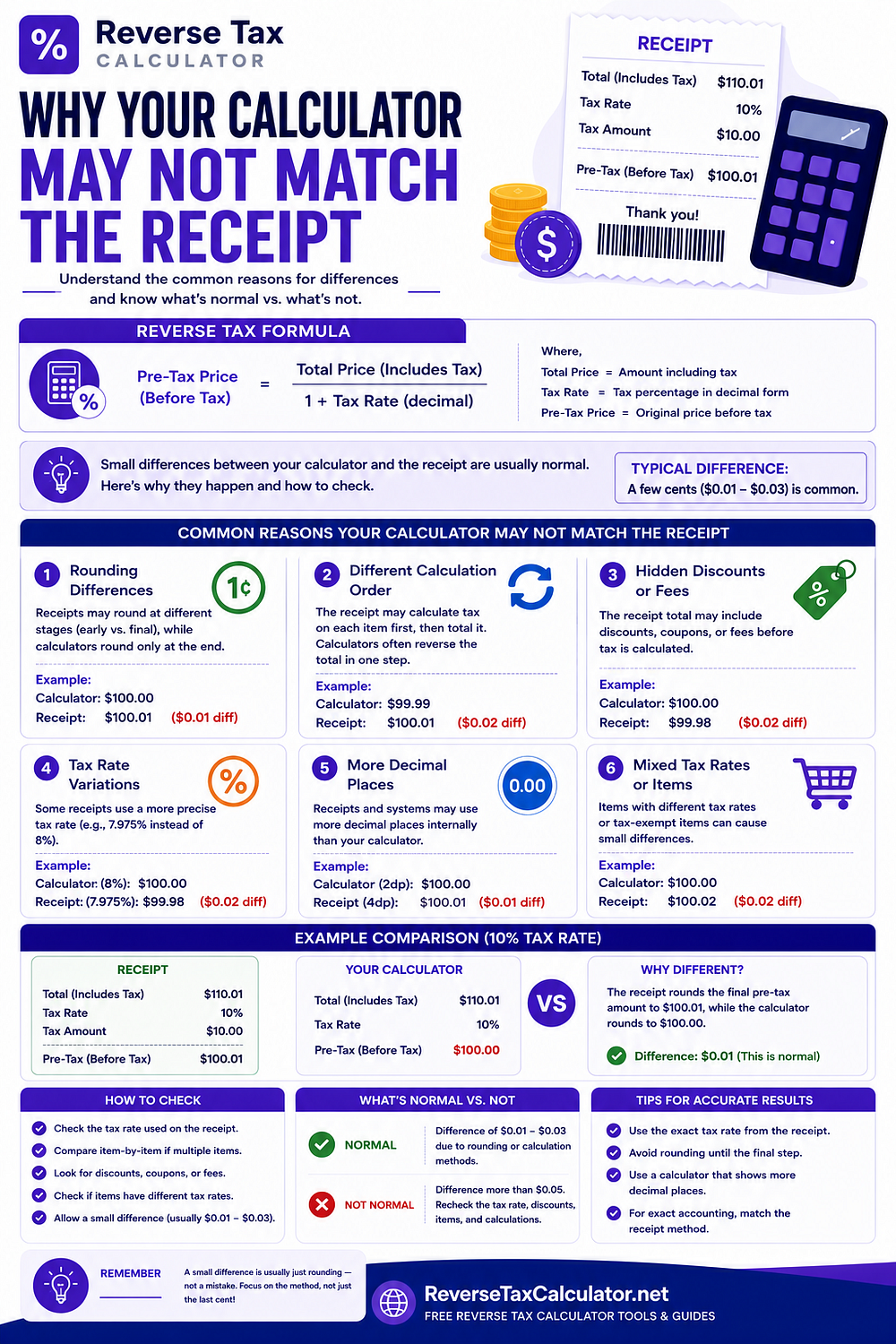
It's usually not the calculator that's wrong.
People often assume a reverse tax calculator has made an error when its result doesn't exactly match the numbers printed on a receipt.
In reality, the calculator is typically applying a straightforward mathematical formula, while the receipt reflects a complete transaction that may include discounts, multiple tax rates, shipping charges, rounding rules, promotional offers, fees, and point-of-sale (POS) system logic.
If you'd like a detailed breakdown of receipt-specific scenarios, read the complete guide on Why Your Calculator May Not Match Your Receipt.
A Receipt Is More Than a Tax Calculation
Many people think a receipt contains only three numbers:
- Price
- Tax
- Total
Modern receipts often include much more.
For example:
- Product-level discounts
- Order-wide discounts
- Manufacturer coupons
- Loyalty rewards
- Shipping fees
- Service charges
- Gift card payments
- Store credit
- Refund adjustments
- Multiple tax jurisdictions
- Tax-exempt items
- Marketplace fees
A reverse tax calculator works with the values you provide. It cannot determine hidden adjustments that aren't visible from the final total alone.
The "Hidden Information" Problem
Imagine two customers each pay exactly $216.00.
Customer A purchased:
- One taxable product
Customer B purchased:
- Two taxable products
- One exempt product
- A coupon
- Taxable shipping
- A promotional discount
Both receipts show the same total.
However, the underlying tax calculations are completely different.
This is why identical totals don't always produce identical reverse tax results.
Seven Questions to Ask Before Blaming the Calculator
Before assuming the calculator is wrong, verify:
1. Does the total already include tax?
Some invoices display tax separately.
Others already include it.
Entering the wrong value changes the entire calculation.
2. Is the tax rate correct?
Using 7% instead of 7.25% may produce noticeable differences.
Always verify the exact rate used on the original transaction.
3. Were discounts applied before tax?
Some discounts reduce the taxable amount.
Others are applied after tax.
The order changes the result.
4. Does the receipt contain exempt items?
Many receipts mix taxable and non-taxable products.
Treating everything as taxable usually creates inaccurate results.
5. Were multiple tax rates used?
Restaurants, marketplaces, and international invoices sometimes combine different tax categories.
A single reverse calculation cannot accurately separate multiple tax groups.
6. Was shipping taxed?
Shipping may be:
- Fully taxable
- Partially taxable
- Completely exempt
Its treatment depends on the applicable tax rules.
7. How did the POS system round values?
Many systems round each line separately before calculating the invoice total.
Others round only once at the end.
A one-cent difference is often the result of this decision.
Why Professional Accounting Software Can Produce Different Results
Two reputable accounting systems can legitimately calculate slightly different tax amounts because they:
- Store different decimal precision
- Apply different rounding rules
- Calculate tax at different stages
- Process discounts differently
- Allocate tax across line items differently
This doesn't necessarily mean either system is incorrect.
Consistency matters more than forcing every program to produce identical numbers.
Reverse Tax Calculators Solve One Problem
A reverse tax calculator answers a specific mathematical question:
"Given a tax-inclusive amount and a tax rate, what are the implied pre-tax amount and tax?"
It does not automatically determine:
- Which receipt lines are taxable
- Which discounts reduce tax
- Whether shipping is taxable
- Which jurisdiction applies
- Whether rounding occurred per line or per invoice
- Whether the receipt contains multiple tax rates
Understanding this distinction helps explain why receipts sometimes differ from simple reverse calculations.
A Practical Troubleshooting Workflow
Instead of comparing only the final total:
- Review each receipt line.
- Separate taxable and exempt items.
- Confirm the original tax rate.
- Check whether discounts changed the taxable base.
- Verify shipping treatment.
- Compare the tax shown on the receipt.
- Perform the reverse tax calculation.
Working from the receipt outward is far more reliable than starting with the total alone.
Common Myths
"If the numbers don't match, the calculator is broken."
Usually false.
"A one-cent difference means the receipt is wrong."
Not necessarily.
"One tax rate always applies to the entire receipt."
Many receipts contain multiple tax treatments.
"Every calculator should return the same answer."
Different rounding policies can produce equally valid results.
When a Reverse Tax Calculator Works Best
A reverse tax calculator is most accurate when:
- The amount already includes tax.
- One tax rate applies.
- No hidden adjustments exist.
- The taxable amount is known.
- The transaction has already been separated into its taxable components.
Once you've identified those values, use the free Reverse Tax Calculator to calculate the pre-tax amount, included tax, and complete breakdown within seconds.
If you want to explore more receipt-specific scenarios and learn why different systems may produce different numbers, read the complete guide on Why Your Calculator May Not Match Your Receipt.
This article was originally published on Reverse Tax Calculator.
Comments
Post a Comment