How to Reverse Tax on Multiple Items Without Miscalculating the Receipt
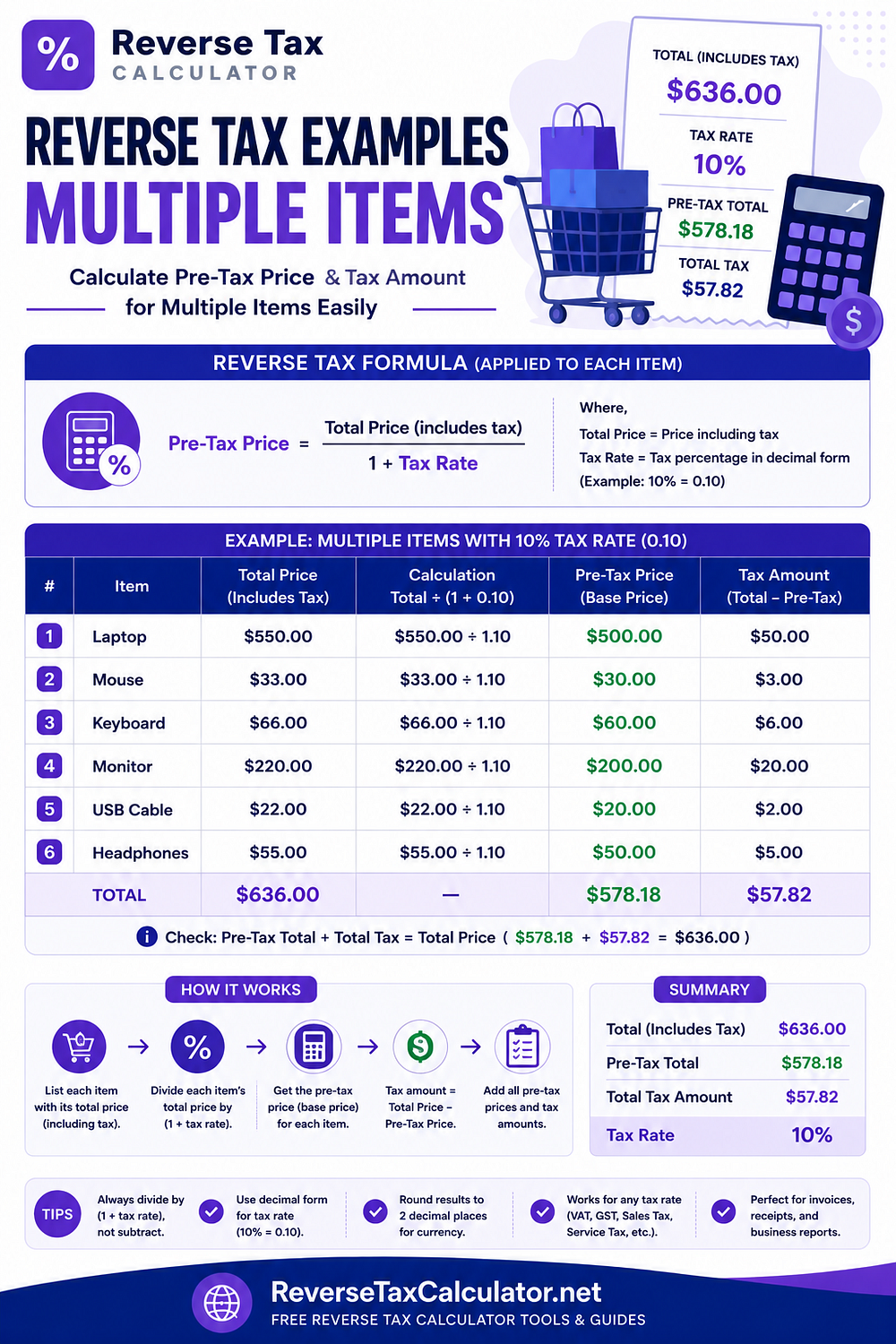
The important question is not how many products appear on the receipt. The important question is whether every item has the same tax treatment.
You may reverse the combined total when:
Every item is taxable
The same rate applies to every item
The total does not include exempt items, tips, credits, or differently taxed fees
When those conditions are not met, separate the receipt into tax groups before calculating.
For a complete set of worked scenarios, see the detailed reverse tax example with multiple items guide.
The Basic Reverse Tax Formula
When an amount already includes tax, calculate the price before tax with:
Price before tax = Tax-inclusive total ÷ (1 + tax rate)
Enter the rate as a decimal.
For an 8% rate:
1 + 0.08 = 1.08
The included tax is:
Included tax = Tax-inclusive total - Price before tax
The same formula works whether the total represents one product or several products. What matters is whether the entire amount uses the same rate.
Example 1: Several Items at the Same Tax Rate
Suppose a receipt contains three taxable items:
| Item | Tax-inclusive amount |
|---|---|
| Item A | 54.00 |
| Item B | 43.20 |
| Item C | 64.80 |
| Total | 162.00 |
Every item is taxable at 8%.
Because the same rate applies to the entire receipt, you can reverse the combined total:
162.00 ÷ 1.08 = 150.00
Now calculate the included tax:
162.00 - 150.00 = 12.00
The result is:
Combined price before tax: 150.00
Included tax: 12.00
Final total: 162.00
You can check the result by applying the tax forward:
150.00 × 8% = 12.00
150.00 + 12.00 = 162.00
The calculation matches the original receipt.
Do You Need to Calculate Each Item Separately?
Not always.
When every item uses the same tax rate and taxability status, reversing the combined total is normally more efficient.
You may still calculate each line separately when:
You need the original price of every product
You are processing a partial refund
You need item-level accounting records
The receipt rounds tax separately for each item
Different departments need separate cost allocations
For a simple receipt-level calculation, the combined total may be enough.
For an audit trail or refund calculation, line-level results may be better.
Example 2: Taxable and Exempt Items
Suppose a receipt total is 162.00.
The receipt contains:
Taxable items totaling 108.00, including 8% tax
One exempt item costing 54.00
Do not divide the entire 162.00 by 1.08.
The exempt item does not contain tax, so only the 108.00 taxable amount should be reversed.
Calculate the taxable price before tax:
108.00 ÷ 1.08 = 100.00
Calculate the included tax:
108.00 - 100.00 = 8.00
The full receipt can now be explained as:
| Component | Amount |
|---|---|
| Taxable price before tax | 100.00 |
| Included tax | 8.00 |
| Exempt item | 54.00 |
| Receipt total | 162.00 |
The receipt contains 8.00 in tax.
If you incorrectly reverse the full 162.00 at 8%, you get:
162.00 ÷ 1.08 = 150.00
That would imply 12.00 in tax, overstating the actual tax by 4.00.
Why Exempt Items Must Be Removed First
An exempt amount does not contain tax to reverse.
Including it in the taxable total causes two errors:
It overstates the included tax.
It understates the combined price before tax.
The same concern may apply to:
Optional tips
Gift cards
Deposits
Store credits
Refund adjustments
Non-taxable fees
These amounts should not automatically be treated as taxable product prices.
Example 3: Items With Different Tax Rates
Suppose a receipt has two groups:
| Group | Tax-inclusive amount | Rate |
|---|---|---|
| Group A | 108.00 | 8% |
| Group B | 120.00 | 20% |
| Total | 228.00 | Mixed |
You cannot accurately reverse 228.00 using one rate.
Each group must be calculated separately.
Group A at 8%
108.00 ÷ 1.08 = 100.00
Included tax:
108.00 - 100.00 = 8.00
Group B at 20%
120.00 ÷ 1.20 = 100.00
Included tax:
120.00 - 100.00 = 20.00
Combined result
| Component | Amount |
|---|---|
| Group A price before tax | 100.00 |
| Group B price before tax | 100.00 |
| Total price before tax | 200.00 |
| Total included tax | 28.00 |
| Tax-inclusive total | 228.00 |
The receipt contains 28.00 in tax.
Trying to use an average or guessed rate on the full 228.00 would mix two separate calculations and may produce an inaccurate result.
Why Averaging Tax Rates Usually Fails
Suppose you average 8% and 20%:
(8% + 20%) ÷ 2 = 14%
Dividing 228.00 by 1.14 gives:
228.00 ÷ 1.14 = 200.00
In this carefully balanced example, the result happens to match the total price before tax because both groups have the same 100.00 pre-tax base.
That does not make 14% a reliable rate.
Change the size of either group, and the simple average can immediately become incorrect. It also fails to show which tax amount belongs to which category.
The safer method is always:
Group items by tax rate.
Reverse each group separately.
Add the before-tax amounts.
Add the tax amounts.
Confirm that everything rebuilds the receipt total.
Example 4: Several Quantities of the Same Product
Suppose a customer buys three identical taxable items.
The tax-inclusive total is 81.00, and the rate is 8%.
Calculate the total price before tax:
81.00 ÷ 1.08 = 75.00
Calculate the included tax:
81.00 - 75.00 = 6.00
Now calculate the price before tax per item:
75.00 ÷ 3 = 25.00
The result is:
| Output | Amount |
|---|---|
| Total price before tax | 75.00 |
| Included tax | 6.00 |
| Price before tax per item | 25.00 |
| Tax-inclusive total | 81.00 |
Buying three units does not require a different reverse-tax formula.
Quantity changes how you divide the result among the products. It does not change the tax logic.
What About a Bundle With One Price?
A bundle may include several products but display only one combined price.
The correct approach depends on how the bundle is taxed.
One taxable bundle at one rate
When the entire bundle is legally treated as one taxable sale at one rate, reverse the combined bundle price.
Taxable and exempt components
When some parts are taxable and others are exempt, the price may need to be allocated among the components first.
Components with different rates
Separate or allocate the bundle price by tax group, then reverse each group with the correct multiplier.
No allocation information
When the invoice does not explain how the bundle price was divided, the result may only be an estimate.
Use the receipt, invoice, contract, or applicable tax guidance to determine whether allocation is necessary.
Total-Level Versus Line-Level Reverse Tax
There are three common approaches.
| Method | Best used for | Main limitation |
|---|---|---|
| Total-level calculation | All items use one rate | Wrong when mixed or exempt lines exist |
| Group-level calculation | Items can be grouped by rate | Requires accurate grouping |
| Line-level calculation | Detailed invoices and refunds | Requires more work |
Total-level calculation
Reverse the entire combined amount once.
Use this when all included items share the same rate and tax treatment.
Group-level calculation
Combine items with the same rate, then reverse each group.
This is usually the best approach for mixed-rate receipts.
Line-level calculation
Reverse each item separately.
This provides the clearest audit trail and may better match receipts that calculate and round tax per item.
Why Multiple-Item Calculations Can Differ by One Cent
A receipt system may calculate tax for every item and round each result to the nearest cent.
A calculator may instead reverse the complete total once.
Those methods can create a small difference.
Consider three items with raw tax of 0.333 each:
| Line | Raw tax | Rounded tax |
|---|---|---|
| Item A | 0.333 | 0.33 |
| Item B | 0.333 | 0.33 |
| Item C | 0.333 | 0.33 |
| Total | 0.999 | 0.99 |
If the system adds the unrounded amounts first and then rounds, it may show 1.00.
If it rounds every item first, it may show 0.99.
A one-cent difference does not automatically mean that your formula is wrong. It may mean the receipt and your calculation use different rounding sequences.
How Discounts Affect Multiple Items
Before reversing tax, determine how the discount was applied.
Discount applies to every item
The discounted amounts may form the taxable base. Reverse the final discounted tax-inclusive total when all items still share one rate.
Discount applies to one item
Adjust only that item or its tax group.
Coupon funded by another party
The taxable amount may differ from the amount paid by the customer, depending on the transaction and applicable rules.
Do not assume every reduction in the amount due reduces the taxable selling price.
How Shipping and Fees Affect the Calculation
A receipt may contain:
Shipping
Handling
Service charges
Deposits
Tips
Payment fees
These amounts may not receive the same tax treatment as the products.
Before reversing the complete receipt total, determine whether each amount:
Is taxable
Uses the same rate
Is part of the selling price
Represents payment rather than a taxable item
Should be removed before calculation
One formula cannot correct an incorrectly classified total.
Multiple-Item Reverse Tax Checklist
Before calculating, ask:
Does the total already include tax?
Is every line taxable?
Does one rate apply to every line?
Are any products exempt or zero-rated?
Are shipping, tips, or service fees included?
Has a discount changed the taxable amount?
Are store credits or gift cards included in the payment total?
Does the receipt show tax per item or only as a total?
Do you need receipt-level or line-level results?
Does the calculation rebuild the original total?
When all items share one rate, you can usually reverse the combined total.
When they do not, group the items first.
Calculate a Same-Rate Total
When every item is taxable at one rate, you can enter the combined tax-inclusive amount into the free Reverse Tax Calculator.
The calculator can show:
Combined price before tax
Included tax
Tax multiplier
Verification calculation
For exempt items or mixed rates, calculate each taxable group separately and then combine the results.
Final Takeaway
Multiple-item reverse tax is not mainly about the number of products.
It is about the number of tax treatments.
Use one calculation when all items:
Are taxable
Use the same rate
Do not include unrelated adjustments
Split the receipt when it contains:
Exempt items
Different tax rates
Differently taxed fees
Item-specific discounts
Mixed taxable and non-taxable amounts
For more worked scenarios and decision tables, read the complete Reverse Tax Example with Multiple Items guide.
Originally published at https://reversetaxcalculator.net.
Comments
Post a Comment